What is a Post Processor?
The first step in the process is to create a design using CAD (computer-aided design software), which is separate to the CNC programming software. You can think of this as a blueprint for your design.
You then need to use CAM software, which takes your CAD drawing file and creates a g-code. G-code is the most widely used CNC programming format and essentially provides information to the CNC machine about what work needs to be done.
The CNC control software is directly connected to the CNC controller with a transfer protocol, usually a parallel DB25 port or USB. The controller then directs the central breakout board which in turn sends instructions to the drivers, based on the information provided by the software. The drivers provide instructions to the motors, which control each axis to create models.
A post processor is a software component that translates the toolpath information generated by your CAM software (like Fusion 360) into G-code instructions your CNC machine can understand. Think of it as the "interpreter" between your design and your machine’s motors.
Without the correct post processor, your CNC may move incorrectly, ignore settings, or even crash.
How it Fits Into the Workflow
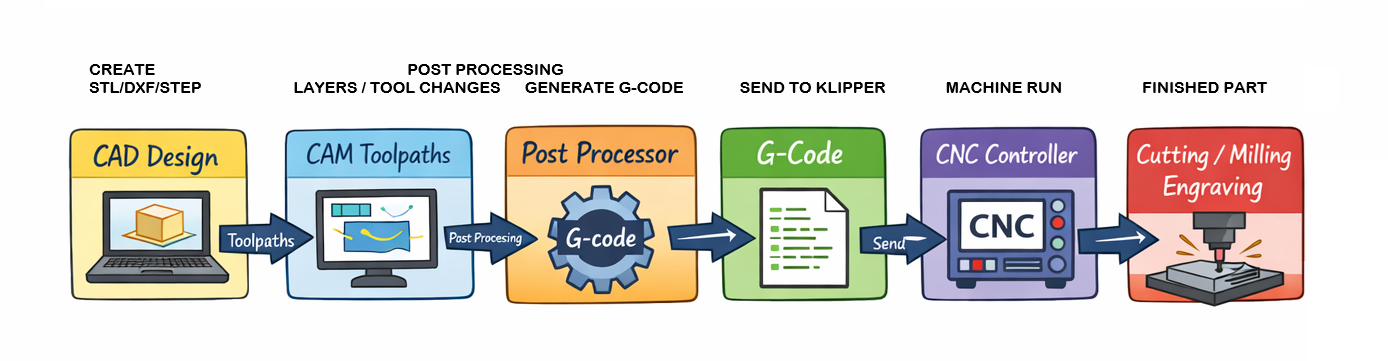
- Design Create your part in CAD software (Fusion 360, FreeCAD, etc.). Define dimensions, shapes, and features.
You may want to look at programs like Deepnest at this stage.
-
CAM (Computer-Aided Manufacturing) Generate toolpaths for your part. Toolpaths include the cutting moves, speeds, feeds, and spindle operations.
-
Post Processor Convert the generic toolpaths into machine-specific G-code. This step ensures that your instructions match the firmware, kinematics, and hardware of your CNC.
-
Example: The Klipperized post processor adapts toolpaths to standard Klipper commands.
-
It handles nuances like:
- G0/G1 rapid vs. linear moves
- Motor steps and acceleration
- Machine coordinates and offsets
- Tool change commands (if applicable)
-
CNC Controller Load the generated G-code into your CNC controller (Mainsail, Fluidd, or other Klipper interfaces). The controller executes the commands, moving your machine precisely along the toolpaths.
-
Cutting / Milling / Engraving Watch your design come to life as the CNC follows the instructions accurately.
Visual Workflow
Why You Need the Right Post Processor
Every machine is slightly different: frame size, stepper drivers, firmware, and even how axes are defined can vary. The post processor ensures your CAM output matches your hardware exactly, avoiding crashes, misalignments, or wasted material.
Key Benefits
- Prevents collisions and crashes
- Ensures accurate scaling and positioning
- Supports machine-specific features (like dual Y-axis in Ender3 CNC)
- Optimizes travel moves and feed rates for performance and longevity
Tip
Always simulate the G-code in your CNC software (like OctoPrint, Mainsail, or Fluidd) before running a real cut. Even with the right post processor, checking ensures safety and accuracy.
Choose a Post Processor
Fusion 360 → FreeCAD → Kiri:moto →